



Overview
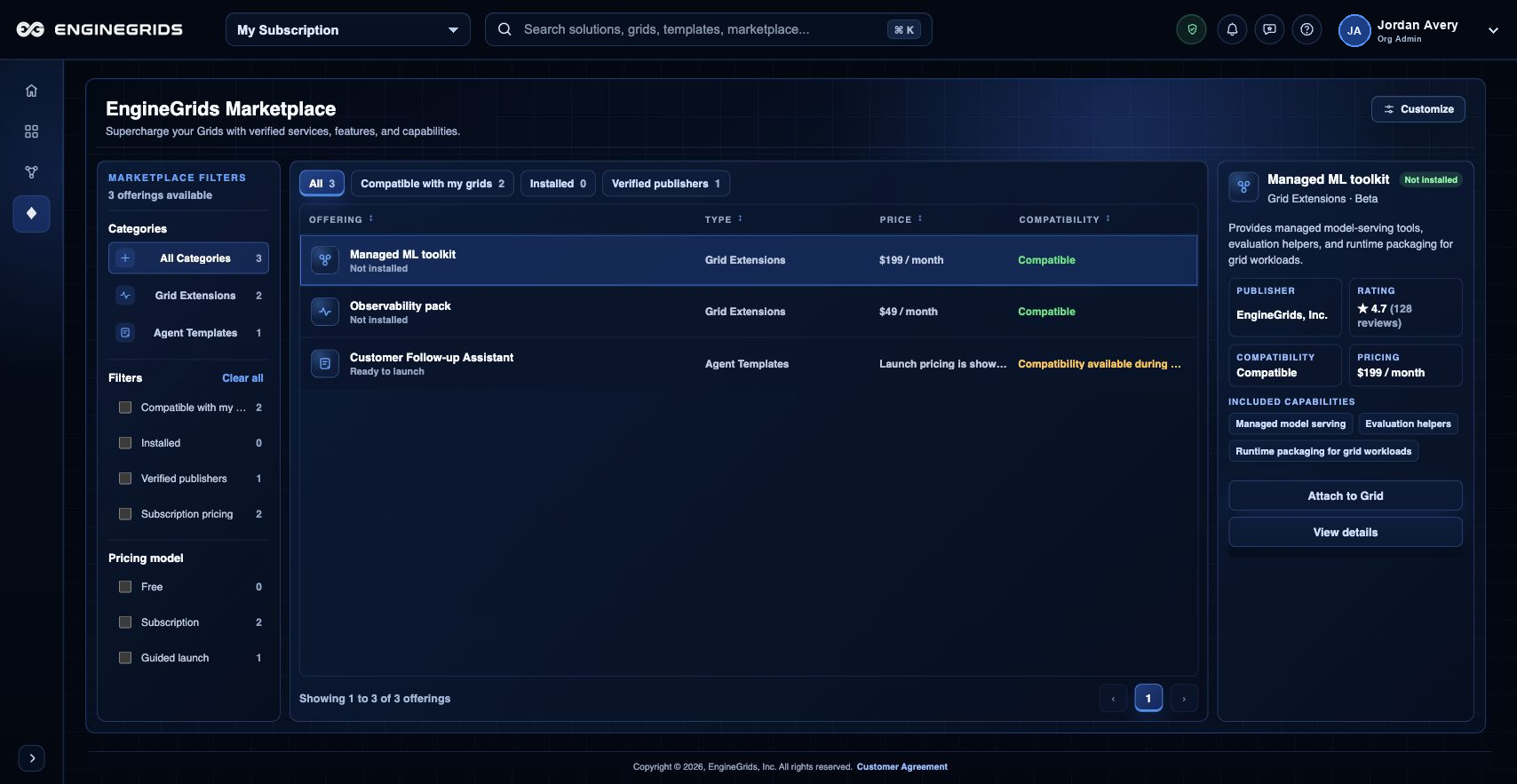
The EngineGrids Marketplace helps customers find verified capabilities that can extend grids and modeled solutions. Use it to compare offerings, review compatibility, and start attachment or template workflows.
What you can do
- Browse verified add-ons and templates from the marketplace canvas.
- Use compatibility and pricing signals before attaching an offering.
- Open detail or attach flows when an offering matches the grid need.
Recommended workflow
- Open Marketplace from the left navigation.
- Scan the catalog or discovery view for the capability you need.
- Review compatibility, publisher, rating, and pricing details.
- Start the attach or template workflow from the selected offering.
Limits and expectations
- Compatibility can depend on the selected grid, subscription, and setup state.
- Some offerings require guided setup before pricing or compatibility is final.
- Marketplace changes can affect billing once an add-on is attached or enabled.
FAQ
What should I check before attaching an offering?
Confirm that the offering is compatible with the target grid, that pricing is understood, and that you have permission to attach marketplace capabilities to the organization or subscription.
What if I cannot complete this workflow?
Confirm the active organization, subscription, and role. If the page still does not explain the blocked state, open Support Center with the route, affected resource, expected outcome, and a screenshot that does not include secrets.