



Overview
Deployment turns a validated Grid Designer model into EngineGrids runtime resources. Use this workflow after the canvas accurately represents the grids, workflows, swarms, runtime sizing, source configuration, and marketplace add-ons that make up the customer solution.
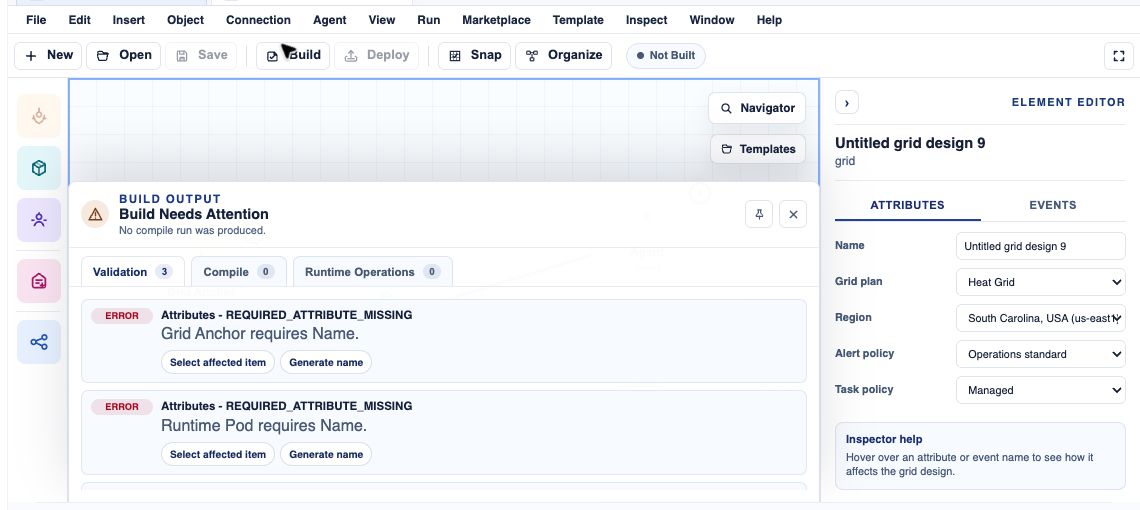
What you can do
- Deploy from Grid Designer only after the model has been saved and validation issues have been resolved.
- Review the target subscription, runtime sizing, source details, and add-on expectations before launch.
- After deployment begins, track the resulting grid from the grid workspace and dashboard activity.
Recommended workflow
- Open the modelled solution in Grid Designer.
- Save the model, then run validation or deployment readiness checks.
- Resolve required issues such as missing runtime choices, incomplete source details, incompatible add-ons, or billing blockers.
- Review the deployment plan, target subscription, runtime sizing, source configuration, and marketplace add-ons.
- Deploy the model and monitor the resulting grid from the dashboard or grid workspace.
Limits and expectations
- Deployment can be blocked by validation errors, missing subscription eligibility, capacity limits, or insufficient role permissions.
- Runtime changes may take time to reconcile after the deployment action is accepted.
- Marketplace publication is a separate request, even when it starts from the same Designer model.
FAQ
Can I deploy without a clean validation pass?
No. Treat validation warnings as launch readiness issues. Resolve required problems before deployment so EngineGrids can create the intended runtime resources.
What if I cannot complete this workflow?
Confirm the active organisation, subscription, and role. If the page still does not explain the blocked state, open Support Center with the route, affected resource, expected outcome, and a screenshot that does not include secrets.