



Overview
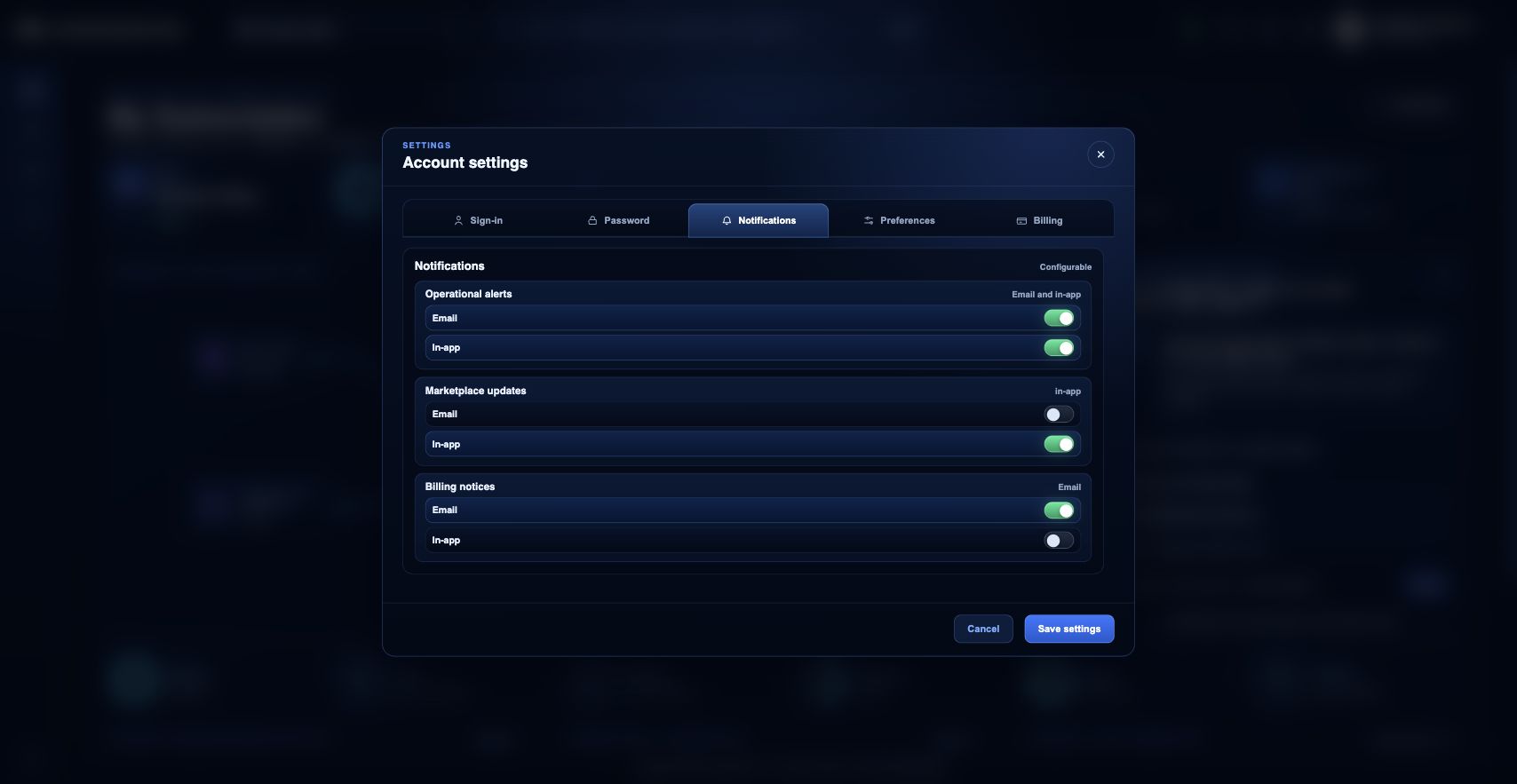
Notification preferences are managed from the Settings modal in the identity badge menu. Use the Notifications tab to choose email and in-app delivery for operational alerts, Marketplace updates, and billing notices.
What you can do
- Configure email and in-app delivery for notification categories.
- Keep operational and billing notifications enabled where your role depends on them.
- Save settings and reload to confirm preferences are still applied.
Recommended workflow
- Open the identity badge menu in the top bar.
- Choose Settings, then select the Notifications tab.
- Toggle email or in-app delivery for each notification type.
- Save settings from the modal footer.
- Reopen Settings or reload the portal to confirm the saved preferences are still selected.
Limits and expectations
- Some security or account-critical messages may still be sent even when marketing or operational categories are reduced.
- Preferences are user-specific and stored as customer attributes, not global system settings.
- Email delivery also depends on the verified email addresses attached to the account.
FAQ
Are notification preferences shared across the organization?
No. These are user preferences. Each user should choose delivery options that match their operational, billing, or administrative responsibilities.
What if I cannot complete this workflow?
Confirm the active organization, subscription, and role. If the page still does not explain the blocked state, open Support Center with the route, affected resource, expected outcome, and a screenshot that does not include secrets.